

Search Engine Handshake
Tell Google, Bing, and AI search you exist, what you publish, and which pages they're allowed to read.
Search engines don't magically discover new sites. They send out automated crawlers that read public web pages, and they only rank pages they can actually fetch and understand. The five items below are how you make that introduction — verifying ownership of your site, handing over a map of your pages, and making sure nothing on your end is accidentally blocking the crawlers.
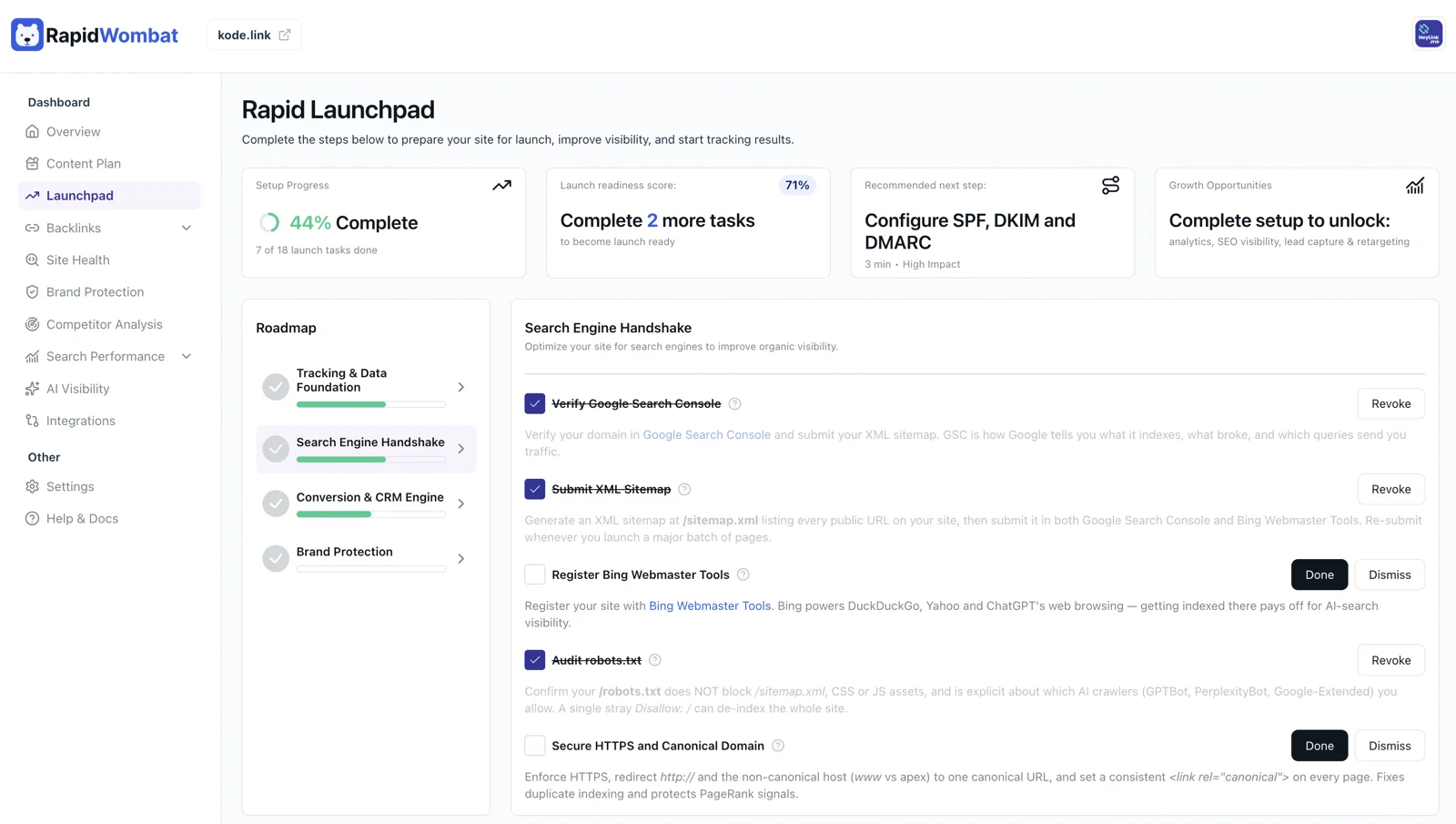
Verify Google Search Console (Priority)
Google Search Console (often called GSC) is Google's free dashboard for site owners. It tells you which of your pages are indexed, which searches send visitors your way, what's broken, and when Google has hit problems crawling your site. It's the most important free tool in SEO and there's no good reason not to use it.
To verify, sign in with your Google account, add your domain, and prove you own it — usually by adding a small DNS record or by uploading an HTML file to your site (GSC walks you through it). You're done when GSC shows a green checkmark next to your property. Within a few days you'll start seeing search performance data, and you'll be the first to know if Google ever stops indexing something.
Submit XML Sitemap (Priority)
A sitemap is a single file at yourdomain.com/sitemap.xml that lists every public page on your site. It's how you hand Google and Bing a tidy table of contents instead of making them guess what exists. Without one, new pages can take weeks longer to appear in search; with one, they often show up within days.
Most modern site builders (WordPress with Yoast, Webflow, Shopify, Squarespace, Ghost) generate /sitemap.xml for you automatically — just open the URL in your browser to confirm it loads. Then submit it inside both Google Search Console (under Sitemaps) and Bing Webmaster Tools. Re-submit any time you launch a big batch of new pages. You're done when both consoles show "Success" and a discovered-pages count that roughly matches your site.
Register Bing Webmaster Tools
Bing's market share looks small until you remember what runs on it: DuckDuckGo, Yahoo, AOL, and — most importantly today — ChatGPT's web search. Registering with Bing Webmaster Tools gets you indexed across all of them at once, which matters more every year as AI assistants quote search results in their answers.
The good news: if you already verified your site in Google Search Console, Bing has a one-click import that pulls everything across in under a minute. Otherwise verify the same way you did with Google — DNS record or HTML file upload. You're done when Bing Webmaster Tools shows your domain as verified and your sitemap discovered.
Audit robots.txt (Priority)
robots.txt is a tiny text file at yourdomain.com/robots.txt that tells crawlers which parts of your site they're allowed to read. A single wrong line in this file can de-index your entire site overnight — it's the number one cause of "we suddenly disappeared from Google" stories.
Open yourdomain.com/robots.txt in your browser and check three things. One: there's no Disallow: / line by itself (that blocks everything). Two: your sitemap is listed (Sitemap: https://yourdomain.com/sitemap.xml). Three: it doesn't block CSS or JavaScript files — Google needs those to understand your pages. While you're in there, decide which AI crawlers to allow (GPTBot, PerplexityBot, Google-Extended); blocking them keeps your content out of AI training and AI search answers, allowing them puts you in the running for AI citations. You're done when Google Search Console's robots.txt tester gives your file a green light.
Secure HTTPS and Canonical Domain
Google treats http://yoursite.com, https://yoursite.com, www.yoursite.com, and yoursite.com as four different sites unless you tell it otherwise — and splits your ranking signals across all of them. The fix is to pick one canonical version and redirect the other three to it.
First, make sure HTTPS is on (the padlock icon in the browser bar). Most hosts and site builders enable this with a single toggle. Second, pick either www or no-www as your one true address, and set up 301 redirects from the other variants — your hosting provider or site builder usually has a "primary domain" setting that does this for you. Third, make sure every page sets a <link rel="canonical"> tag pointing at its preferred URL (most SEO plugins do this automatically). You're done when typing any variant of your URL into the browser lands on the same final address with a padlock.
Submit Your Website to Brave
Brave Search runs its own independent index — it doesn't just re-serve Bing or Google results — and it powers Brave's browser search bar plus the Brave Leo AI assistant. It's smaller than Google or Bing, but it's a free extra crawl path, and AI assistants increasingly draw on independent indexes like Brave's when answering questions.
Go to Brave Search — Submit URL, enter your homepage (and any key pages), and submit. There's no verification step or dashboard — it's a one-way nudge that tells Brave's crawler your page exists and asks it to visit. You're done once you've submitted your homepage and top-level pages; give the crawler a few days to pick them up.
Next: Conversion & CRM Engine — turn the visitors you're now measuring into contacts you can reach again.