

Brand Protection
Lock down your name, reviews, and reputation across the web before someone else does.
Your brand name is one of the few things on the internet that's genuinely yours — unless someone else grabs it first. The four items in this category are mostly one-time defensive moves: claim your handles, claim your Google listing, publish the legal pages every serious buyer expects to find, and check that nobody is dragging your search ranking down with low-quality links. None of this is glamorous, and all of it pays off for years.
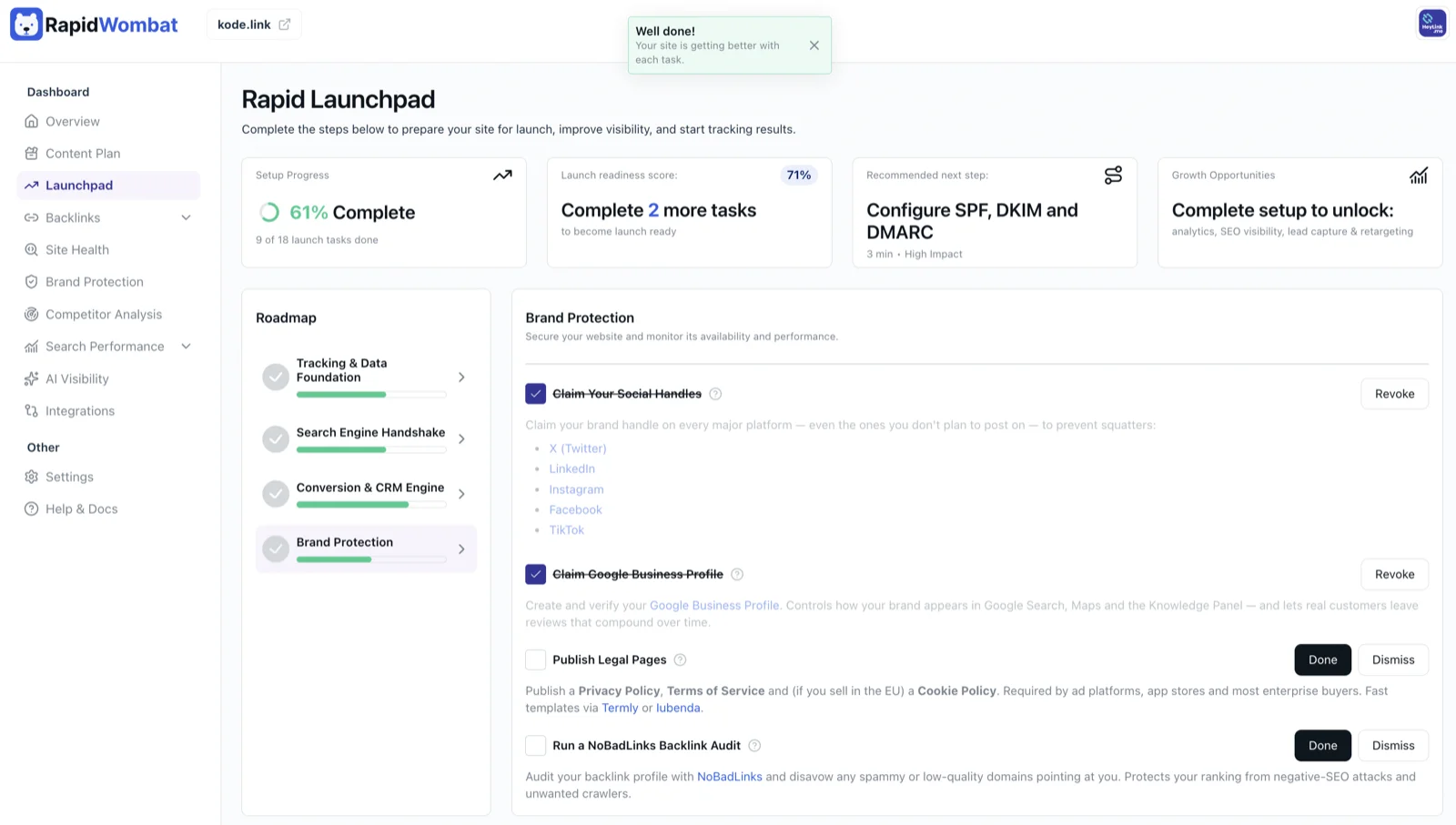
Claim Your Social Handles
Even if you have zero plans to post on TikTok or Instagram, you should own your brand name there. Squatting — where someone else registers your name and either holds it for ransom, posts pretending to be you, or quietly damages your reputation — is common, and recovering a stolen handle from a platform's support team can take months and isn't guaranteed to succeed. Claiming a handle is free and takes about a minute per platform.
Reserve your name on the five platforms that matter most for brand impersonation risk: X (Twitter), LinkedIn (both a personal profile and a company page), Instagram, Facebook, and TikTok. If your brand name is taken on one, pick a consistent variant (@yourbrandhq, @getyourbrand, @yourbrand_co) and use the same variant everywhere. You're done when typing yourbrand into each platform's search returns your account at the top.
Claim Google Business Profile
Google Business Profile is the panel that shows up on the right side of Google search results when someone types your brand name — with your logo, hours, photos, a description, and customer reviews. It also controls how you appear on Google Maps. For local businesses it's the single most important free marketing asset on the web; for online-only businesses it still controls your "Knowledge Panel" and gives you a place to collect public reviews.
Sign in with the Google account that should own the listing, search for your business name, and either claim the existing entry or create a new one. You'll go through a verification step (postcard, phone, or video) so Google knows you're really the owner. Once verified, fill in everything: description, categories, services, hours, logo, cover photo, and at least three product or service photos. You're done when you can search your brand name on Google and see the right-side panel with your logo and a "You manage this Business Profile" badge while signed in.
Publish Legal Pages (Priority)
A Privacy Policy explains what data you collect and how you use it. Terms of Service set the rules for using your site. A Cookie Policy (required if you sell to anyone in the EU) discloses your cookie use in detail. These aren't optional. Google Ads, Meta Ads, the Apple App Store, Google Play, every payment processor, and most enterprise buyers will block, reject, or refuse to do business with sites that don't have them.
You don't need a lawyer to start. Use Termly or Iubenda — both walk you through a short questionnaire and generate the documents in minutes. Publish them at clean URLs (/privacy, /terms, /cookies) and link to all three from your site's footer. If you later add a feature that changes how you handle data (a new analytics tool, a checkout, a chatbot), re-run the generator and update the page. You're done when all three pages are live, linked in your footer, and dated within the last 12 months.
Run a NoBadLinks Backlink Audit
A backlink is any link from another website pointing at yours. Good backlinks (from real, relevant sites) push your search ranking up; bad backlinks (from spam farms, hacked sites, link-selling networks, or domains in unrelated industries) can drag it down — and competitors occasionally point bad links at rivals deliberately, a practice called negative SEO.
NoBadLinks scans your backlink profile and flags the risky ones. Once you see the report, you have two options for each bad link: contact the linking site and ask them to remove it, or — far more practical — submit a disavow file to Google Search Console telling Google to ignore those links when ranking your site. Run this audit once at launch, then again every six months or any time you notice a sudden drop in rankings. You're done when your disavow file is uploaded in Search Console and your NoBadLinks report shows no untreated high-risk links.
That's the full Launchpad. Head back to the overview to see your remaining priority items, or jump to the dashboard overview to start using everything you just set up.